ARMxy industrial-grade edge gateways (BL340/BL410/BL450), combined with ThingsBoard IoT Gateway, provide a ready-to-use integrated "device-edge-cloud" IoT solution. Supporting over 30 industrial protocols including Modbus, OPC-UA, and CAN, they feature edge data processing, local caching, offline data transmission recovery, and AI inference capabilities (BL450), easily enabling device data upload to the cloud, remote monitoring, and predictive maintenance.
Case Details
Solution Overview
The ARMxy series industrial edge gateways (e.g., BL340, BL410, BL450) can be seamlessly integrated with the ThingsBoard IoT Gateway to enable multi-protocol device access, edge intelligence, and cloud collaboration. This architecture is ideal for industrial automation, smart cities, smart agriculture, and other IoT deployments.
Powered by high-performance ARM processors (RK3568, RK3588J, TI AM62x, NXP, etc.) and rich industrial interfaces (RS485, CAN, Ethernet, WiFi/4G), combined with ThingsBoard’s Modbus, OPC-UA, and MQTT support, the system forms a complete end–edge–cloud IoT solution.
Hardware Selection
| Level |
Recommended Model |
Key Specs |
Typical Scenarios |
| Entry-level |
BL340(T507-H) |
2×100M Ethernet, RS485/DI/DO, low power |
Small-scale data acquisition & protocol conversion |
| Mid-range |
BL370 (RK3562) |
RK3562, multiple RS485/CAN, 4G/WiFi, rich I/O |
Medium-sized factories, building automation |
| High-performance / AI |
BL450 (RK3588J) |
8-core (4×A76 + 4×A55) @ 2.4 GHz, 6 TOPS NPU, Gigabit Ethernet, multi-bus |
AI edge inference, predictive maintenance, complex scenarios |
Software Deployment (ARMxy + ThingsBoard Gateway)
Install required packages
Download ThingsBoard Gateway
Prepare Python environment
Check version:
If lower than 3.8:
Create a Gateway on ThingsBoard Cloud
Navigate to Entities → Gateways → Add Gateway
Record Platform host and Access token.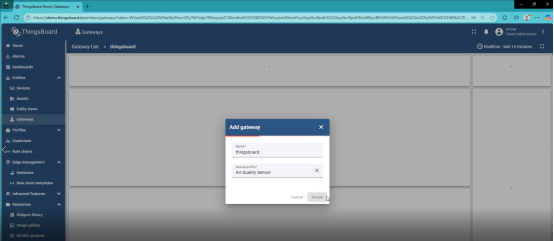
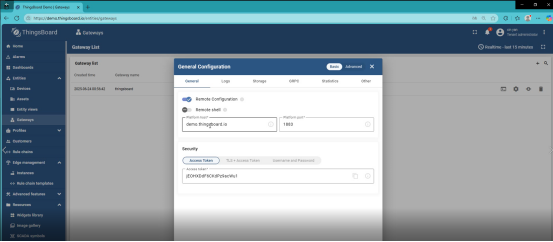
Configure on ARMxy
Python installation requirements
pip install -r requirements.txt
python setup.py install
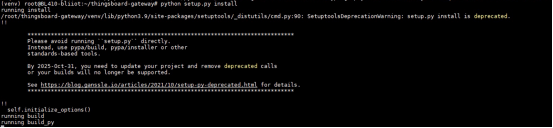
mkdir logs

thingsboard-gateway/thingsboard_gateway/config

Open `vi tb_gateway.json` and modify the values of "host" and "accessToken" to the Platform host and Access token you just recorded.
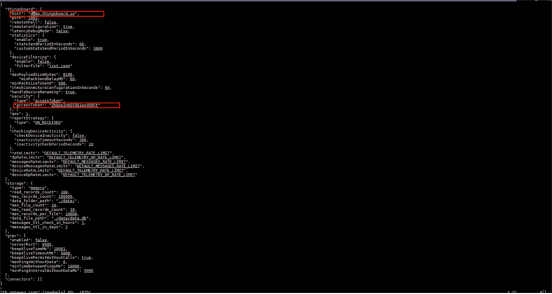
Start the Gateway
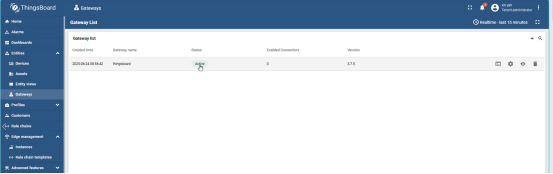
Check the ThingsBoard dashboard—Status should become Active.
Data Flow & Protocol Conversion
-
ARMxy collects Modbus data via RS485
-
The gateway converts register values → MQTT messages → cloud device shadow
-
Supports local SQLite data persistence
-
Offline buffering and automatic sync after reconnection
Typical Application Scenarios
-
Predictive maintenance for automotive production lines
-
Energy optimization in chemical plants
-
Smart water pump station monitoring and remote control
-
Cold-chain container environmental monitoring
-
Wind turbine fault prediction and remote diagnostics
-
Smart campus security & energy automation
-
Water treatment dosing and safety-energy linkage control
-
Intelligent warehouse sorting & equipment maintenance automation


